How to Tell Real Social Proof From Fake
Plenty of Shopify social proof apps generate their numbers. Here is the one question that separates them from the ones that measure, and three ways a number can be real and still mislead.

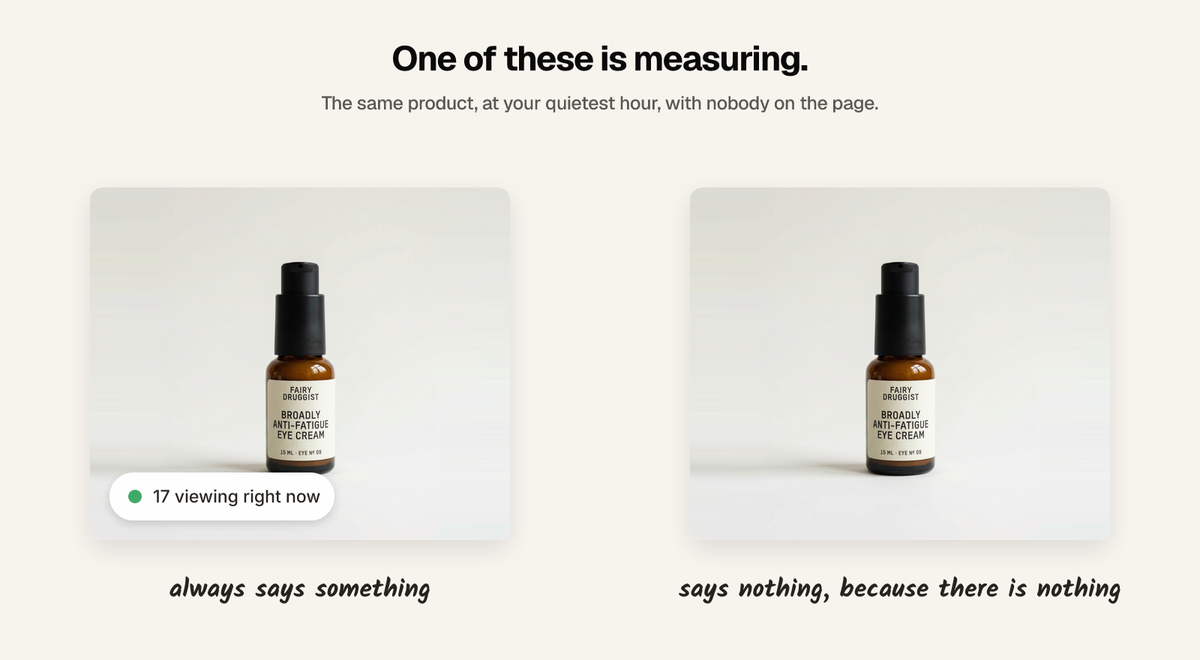
Ask the vendor one question: what does it show on a product nobody is looking at? An app that measures says nothing, or says one. An app that generates has a floor, because a widget admitting the number is zero has defeated its own purpose. Everything else follows from that.
The shortcut is worth naming early, because it is common and it is not always obvious from the outside: a lot of the "17 people are viewing this" and "8 added to cart" badges on the internet are numbers on a timer.
The tells are in the settings screen
You do not have to catch a fake in the wild. Open the app's configuration and look for any control that decides the number rather than the display:
- A minimum value. A measured count has a natural minimum, which is zero.
- A range, like 5 to 20. Ranges are for generators.
- A refresh interval that changes the number. Refreshing how often you read a number is fine. Refreshing to make the number move is not.
- No timeframe anywhere. "142 sold" with no window is a lifetime total that only grows, and eventually means nothing about today.
- A "boost" or "multiplier" setting. Some apps let you scale a real number. That is a fabricated number wearing a real one's clothes.
If none of those exist, the app is probably measuring. If any of them do, the number on your storefront is a decision you made, not a fact about your store.
Three ways a number can be wrong
Fabrication is the obvious one and the least interesting, because it is easy to detect. The other two are what actually catch people out.
It was never measured
Generated on a timer, or from a range you set. Detectable in ten seconds by the tests above.
It was measured, but it is stale
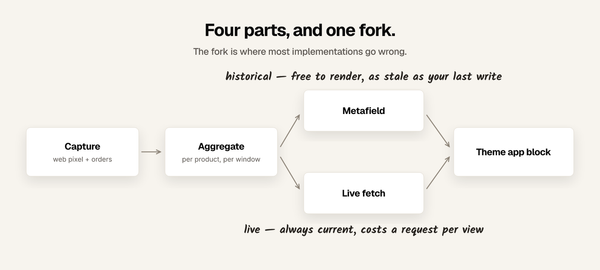
Real when it was computed, wrong by the time a shopper reads it. This is the common failure in apps that render counts into the page HTML: Shopify caches storefront pages hard, so a number baked into the markup can be served to thousands of people long after it stopped being true. Live counts and cached pages are difficult to have at the same time, and an app that does not mention how it handles that has usually not handled it.
It was measured and current, but it does not mean what it says
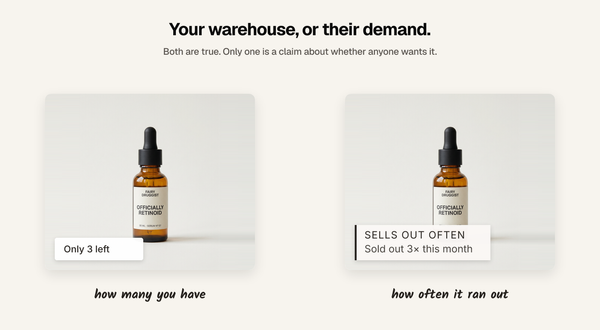
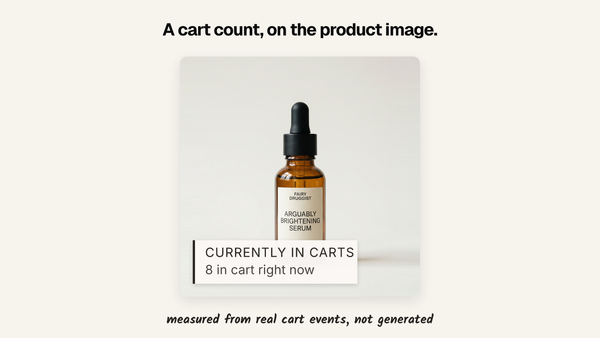
The subtle one. A count of add-to-cart events is not a count of people — one shopper adding the same item three times is three events. A lifetime total presented without a window implies recency it does not have. A count divided by a short window quietly publishes your daily rate to anyone who cares. And "8 bought" attached to cart data is simply a different claim from the one the data supports.
None of these require anyone to lie. They just require nobody to have thought about it.
Test it yourself in five minutes
- Find your quietest product — one you know has had no orders and little traffic this week.
- Open it in a private window, at your quietest hour, with the app live.
- If it claims a crowd, you have your answer. A measured widget shows nothing there.
- Reload a few times. If the number moves while nothing is happening on your store, it is on a timer.
- Open two browsers at once. Two different crowd sizes for the same product at the same second is a generator with a random seed.
Step 5 is also the shopper-facing risk in miniature. A shopper who opens two tabs and sees two different numbers has learned something about your store you cannot unteach.
Apply it to mine, too
I build one of these, so the tests above are not much use unless they also point at me.
Sold So Many has no minimum, no range, no multiplier and no refresh-to-move setting. On a product with nothing behind it, it renders nothing — and that is the behaviour that costs the most in demos, because an empty product page is not a good screenshot. Counts come from your Shopify orders and your storefront pixel events. Windows are always stated. On thin catalogues counts are coarsened or withheld, so a competitor cannot divide by the window and read your daily rate off your own product page.
The honest objection is the copy editor. You can rewrite the wording of any label. That means you could, in principle, write something the number does not support. What you cannot do is change the number, invent one, or make a label appear on a product with no data behind it — the words are yours, the figure is your store's. I would rather say that plainly than pretend the feature does not exist.
It is 5.0 rated from 3 reviews — a small number, and worth weighing against apps with hundreds. Free up to 10,000 monthly visitors, $19 a month above that.
Why merchants pick the fake one anyway
Usually not cynicism. Usually this: the real number is 2, and 2 feels worse than nothing.
That instinct is right about the number and wrong about the fix. The answer to a small number is not a bigger invented one, it is a different true thing:
- Set a display threshold. Show the label only above a count you choose. Below it, show nothing. The page is quieter and everything on it is true.
- Widen the window. "48 added to cart this week" is a real number and a larger one than today's.
- Change the signal. On a product with few orders but real traffic, views or cart adds carry more than a sold count. On a new product, neither — a restock or a rating might.
The general principle: match the signal to the product instead of putting one widget on all of them. Fabrication is what you reach for when the app cannot do that.
What it costs when it goes wrong
Fake social proof does lift conversion in the short run. That is why it exists.
The cost is not a moral one, it is a structural one. The products where an invented number flatters you most are exactly the products with nothing behind them, so your least-proven inventory carries your most confident claims. And the failure mode is not a slow decline — it is one shopper, one screenshot, and a permanent change in how they read every number on your site.
If you take one thing
Ask what it shows on a product nobody is looking at. Ask it about mine too.
FAQ
How can I tell if a Shopify social proof app is using fake numbers? Look for a minimum value, a range, or a refresh interval that changes the number in the app's settings. A measured count has no minimum other than zero, so any control that sets a floor is generating the figure rather than reading it.
Do social proof apps really make up numbers? Some do, openly — the setting is usually presented as a "minimum" or a "range" rather than as fabrication. Others use real data. The settings screen tells you which you have within seconds.
Is fake social proof against Shopify's rules? Shopify's App Store guidelines require apps not to mislead shoppers, and consumer protection law in the UK, EU and US treats invented purchase claims as deceptive advertising. Enforcement is patchy, which is why the pattern persists, but "everyone does it" is not a defence.
What should I show on a product with almost no sales? Either nothing, or a different true signal. A display threshold, a wider window, or switching from sold counts to views, cart adds or a rating all work. Inventing a number is the one option that creates a problem rather than solving one.
Can a real number still be misleading? Yes, and this is the common case. A lifetime total with no timeframe implies recency it does not have, a count of events is not a count of people, and cart data presented as purchases is a different claim from the one the data supports.
Written by Mehmet Tekin, 2 September 2026. I build Sold So Many, a Shopify social proof app, so treat the section about it as disclosed rather than neutral — and apply the tests above to it.